
Actions on a State
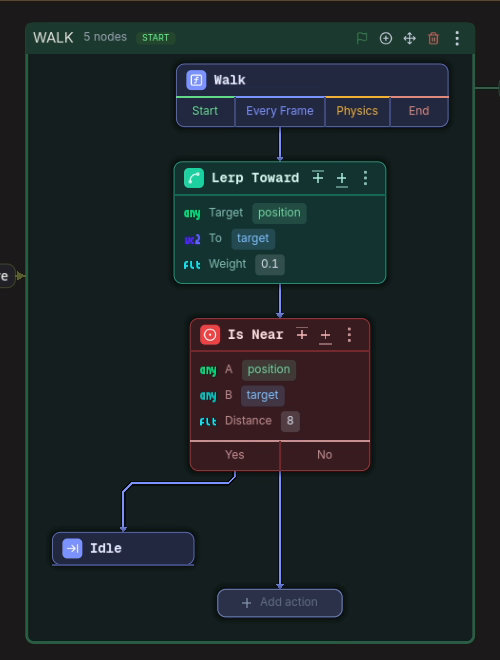
An action is a pre-built step. On the canvas, a state’s entry node carries four cells and the steps hang off them, chained one after another, so you read a state and its behaviour in the same place.
The cells
Section titled “The cells”| Cell | When it runs |
|---|---|
| Start | once, when the state becomes active |
| Every Frame | every frame while it is active |
| Physics | every physics frame while it is active |
| End | once, on the way out |
Clicking a cell opens the action search and drops the step on that phase. At the end of every chain there is a grey Add action node that does the same for the end of that chain, and a branch that carries steps grows one too.
The card
Section titled “The card”Each step is a card: its icon and name, then its values as chips, one per field. A field fed by another action shows up as a nested capsule inside the card, one shade darker at each level.
What reacts to a click:
- A chip: edits the value in place. Enter confirms, Esc cancels. A field with a fixed option set opens its picker instead.
- The card’s name: opens the full panel, one editor per field, where bindings, expressions and inline values live.
- An input pin: fills that field with another action.
- An output dot: drag from it onto an input pin to feed it. A small dot on the input undoes it, and the counter badge on an output lights up everything reading it.
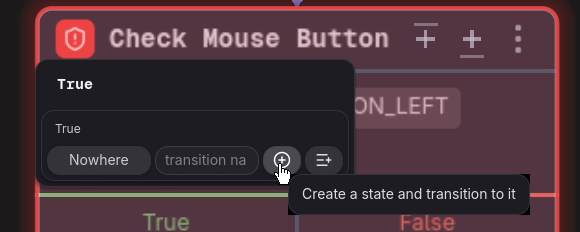
- A branch cell: opens the branch editor, with the target, the transition name, a button that
creates the target state, and a button that adds a step to the branch. The target and the steps are
independent, and the steps always run before the transition. Adding a step closes the editor, so a
branch that does both is set in two passes, or by ending its steps with a
Transitionaction. - The three dots, or a right-click anywhere on the card: the menu.
The menu
Section titled “The menu”Add above, Add below, Phase, Replace, Delete, Duplicate, Move up, Move down, Rename and Disable.
Rename only relabels the card, which is how a state reads like a sentence. Disable keeps the card and its values and emits no code, which is how a debug step is parked instead of deleted.
The first three are missing on an action fed inline into a field: a value has no place in a chain and no phase of its own.
The field sources
Section titled “The field sources”Each field holds exactly one of: a literal, a binding to a variable, a node property or a built-in value, a free-text expression, an inline action, or a wire from a step above. Some fields are where a value lands rather than where it comes from, and those take a binding only.
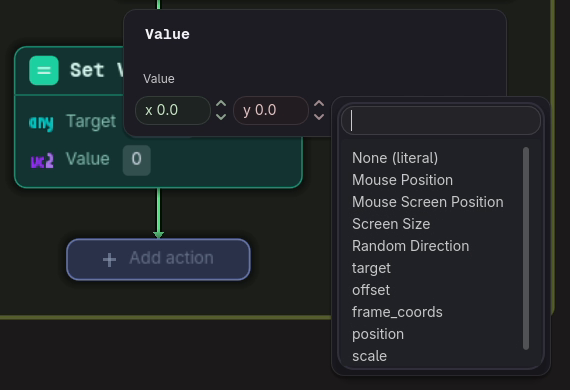
Variables and binds walks through all of them.
The action library
Section titled “The action library”Every action, with its fields, defaults and branches, is in the Actions reference, generated straight from the plugin.
Missing a step? Actions are plain GDScript files and your project can add its own, see Write a Custom Action.
While the game runs
Section titled “While the game runs”With Debug Compilation on, a card lights up as execution reaches it and transitions flash in the diagram. See Debugging.